

How To Get Around Previous Email Registered Android Phone

"I was away for some business concern trip and left my personal Android phone back at abode. Upon coming back, when I switched on my device, I got the post-obit message:
This device was reset. To continue, sign in with a Google Account that was previously synced on this device. Now I am unable to admission my telephone across the startup screen. Is there any way effectually such an mistake? Will I be able to open my files over again?"
Given the popularity of Android phones and its extreme usage amongst the masses, the probable occurrence of this mistake is quite high, and in that location are exceptionally technical means to fix information technology. No affair which brand of Android phone you are using, we volition testify how to bypass the "This device was reset" error with different feasible solutions. If you are unable to open your files nether any scenario, and then we volition also lead you to the method to recover those files instantly.
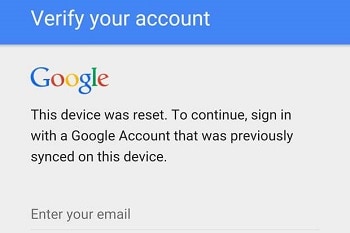
- Function 1: "This device was reset. To continue, sign in with a Google Account that was previously synced on this device." What is the Problem?
- Part ii: How to Bypass "This device was reset. To keep, sign in with a Google Account that was previously synced on this device"?
- Part 3: Tips: How to Avoid Being Locked with FRP Again?
- Function 4: Tips: How to Recover Lost Information from Android SD Card after Fixing the Fault?
Office 1: "This device was reset. To continue, sign in with a Google Business relationship that was previously synced on this device." What's the Problem?
This error occurs typically when the Android phone'southward default Mill Reset Protection (FRP) gets activated, due to some mishap or adventitious mill reset. Information technology is a security protocol offered by the Android Bone to its user to reset the telephone/device outside of the congenital-in settings characteristic.
If you wish to acknowledge the reset initiation, then all y'all are required to do is enter your Google account credentials and start using the Android telephone from scratch. Just if you wish to proceed your settings on the telephone intact or forgot your login data, then you can bypass the Google sign-in option through a variety of fixes, which nosotros will discuss in the latter part of the article.
Part 2: How to Bypass "This device was reset. To go on, sign in with a Google Account that was previously synced on this device"?
In that location are three methods to fix the manufacturing plant reset protection protocol and bypass the Google account sign-in, which we have stated in the list below:
- Method i: Ready FRP through the OEM Unlocking feature.
- Method two: Use FRP Bypass APK to ready Google Account Verification.
- Method 3: Reset the device.
Method 1. Fix FRP through the OEM Unlocking feature:
The OEM unlock feature is a style of breaking an agreement between the user, and the manufacturer, which also enables the user to perform anything on the Android phone through the bootloader. It also allows us to implement a custom recovery on your phone instead of using the default methods which are offered by your Google. If you previously had the OEM unlocking feature activated, then you will be able to fix the factory reset protection immediately.
Method two: This Device was Reset – Employ FRP Bypass APK to fix Google Account Verification:
You tin featherbed the Google sign-in through the help of a third-party app of the apk format. Here are the steps to perform such a procedure with FRP bypass apk app:
- Download the FRP bypass apk from its official website and copy the downloaded file on your USB flash drive;
- Open your Android device, enter your Google account login credentials;
- Connect an OTG cable with the USB and the Android device;
- You will meet a file explorer feature opening on the Android phone; information technology is the USB folder;
- Locate the FRP Bypass apk file from the file manager and install the apk app;
- Once the installation is complete, tap on open up from the Development Settings option;
- Down on the listing, tap on "Backup and Reset" option;
- Now tap on the "Mill Data Reset" option and confirm the activity;
- That's it. Yous had successfully fixed the "This Device was Reset" fault and bypassed the Google sign-in pick.
Method 3: Reset the device:
If y'all are notwithstanding unable to bypass the Google sign-in lock and practise not remember the login credentials of your Google business relationship, then the logical solution is to perform a hard reset of the device. Follow the instructions below to reset the Android device:
- If you are using a Samsung telephone, so press and simultaneously hold the Ability push, Volume Up button, and the Home button(located at the bottom of the screen);
- You lot are required to keep belongings the buttons until yous run into a booting display on the screen;
- Select the "Wipe Data/Factory Reset" option and go along farther;
- At present select the "Aye – Delete all user data" selection;
- Select through the ability button the choice: Reboot System Now.
Part iii: Tips: How to Avert Being Locked with FRP Again?
Here are the steps to avert manufactory reset protection by using the OEM unlocking feature:
- Go to settings of the Android device;
- Tap on the "About Phone" option and tap on "Software info";
- Tap the build number of the device from the menu 7 times, which will activate the Developer Mode;
- Enter Developer options and check whether the OEM Unlock switch is on or off. Turn it ON!
The bootloader on the Android telephone will successfully get unlocked, and you will exist able to run any unsigned activity on your it, which will as well allow you to disable the FRP lock setting, whenever the result occurs.
Other popular Manufactures From Wondershare

How To Get Around Previous Email Registered Android Phone,
Source: https://recoverit.wondershare.com/phone-recovery/this-device-was-reset.html
Posted by: thornecovioll59.blogspot.com
0 Response to "How To Get Around Previous Email Registered Android Phone"
Post a Comment